 Patched and Backed Up
How small websites get hacked
Last reviewed
In short
- Many attacks come from automatic programs, not from a person who picked you.
- The usual ways in are weak logins, old software, an infected computer and a shared server.
- You can't make a site perfectly safe. You can make it a hard target.
Who is attacking you?
Often, nobody has picked your site. Many attacks are carried out by bots, which are programs that run on their own.[1] Because bots work on their own, it's a fair guess that a person hasn't picked your site.
That's why "my site is too small to matter" doesn't work. A bot works automatically. It just tries its trick on whatever it finds.
Four ways in
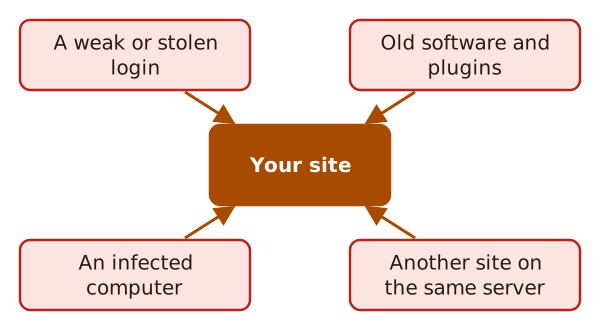
1. A weak or stolen login. Small and medium businesses are frequent targets, and weak or stolen passwords are one of the easiest ways into their accounts.[2] A bot can guess a short password. A thief can reuse one that leaked from another site. Read logins, passwords and two-factor to fix this.
2. Old software. One common attack sends specially made requests that aim at a known flaw. These flaws often sit in old or outdated plugins and software.[1] The fix is simple, and it has its own page: keeping software updated.
3. An infected computer. Your site can be secure and still lose to a keylogger, a program that records what you type. No security on the site helps if one is on your computer.[1] So the computer you log in from matters too.
4. A neighbour on the same server. On shared hosting, other sites live on the same server as yours. If one of them is compromised, yours can be too.[1] Ask your host what they do about this.
Who looks after what?
Your host looks after the infrastructure, which means the machines and the network. They aren't responsible for the application you choose to install.[1] The WordPress handbook says hacks are rarely down to the infrastructure and most often down to the application.[1]
So the habits in this site are mostly yours to keep.
What "secure" really means
Nobody gets a perfect score. Security is risk reduction, not risk elimination.[1] You make your site harder than the next one, and you prepare for the day it fails.
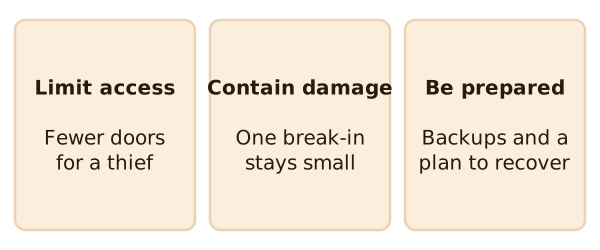
The WordPress handbook gives three ideas to keep in mind. The first is limiting access: make smart choices that reduce the entry points open to a bad actor.[1] The second is containment, so one break-in does little harm. The third is preparation, which means backups and a plan.
One simple rule helps with all three. Don't get plugins or themes from untrusted sources.[1]
What's next
Start with the door that bots try first. Read logins, passwords and two-factor.
Sources
- Hardening WordPress, Advanced Administration Handbook, WordPress Developer Resources (accessed 2026-11-12)
- Require Strong Passwords, CISA (US Cybersecurity and Infrastructure Security Agency) (accessed 2026-11-12)