 Patched and Backed Up
Logins, passwords and two-factor sign-in
Last reviewed
In short
- Make each password long, random and used on one account only.
- Let a password manager remember them for you.
- Turn on a second check wherever you can, starting with admin accounts.
Why the admin login matters most
Your admin login is the front door to your site. A hacker who gets into an administrator account can install harmful scripts. Those can put your whole server at risk.[1]
So this is where to spend your effort first.
What makes a password strong
CISA, a US government agency, says a strong password has three qualities.
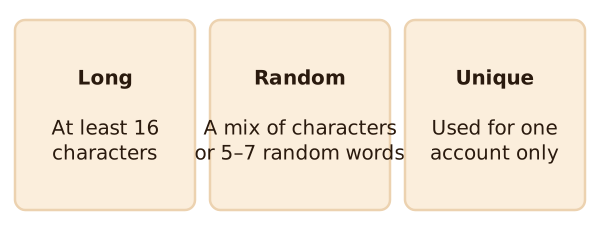
It's long, at least 16 characters, and more is better.[2] It's random. It can be a mix of letters, numbers and symbols, or a passphrase of 5–7 unrelated words.[2] And it's unique, used for only one account.[2]
Unique matters more than it sounds. If you reuse a password, one stolen copy opens every account that shares it.
What to leave out
Don't build a password from your own name, your username, your company name or your site's name.[1] Those are easy for a guesser to work out.
Pick a better username too. Names like admin or webmaster are attacked first.[1] If your install came with a default username or password, change it before you start using it.[2]
Let a password manager remember
Nobody can remember a different 16-character password for every account. A password manager does it for you. It makes complex passwords, stores them, and fills them in.[2] You only remember one strong master password.[2]
This site doesn't recommend any one product. Pick one from a maker you trust, and use a strong master password for it.
Add a second check
A strong password can still be stolen. Strong passwords help, but alone they are no longer enough.[3] Multi-factor authentication, or MFA, adds a layer. It asks for two or more ways to prove who you are.[3] You may also see it called two-factor authentication, or 2FA.[2]
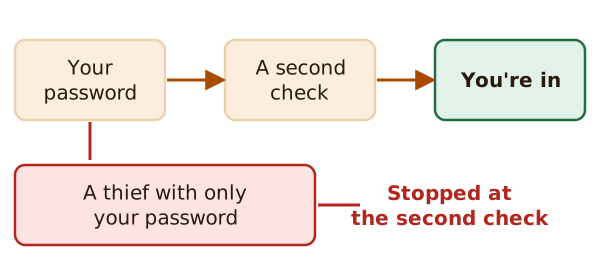
With MFA, a thief who has only your password gets stopped at the second check.
Which second check?
Some are stronger than others. Any MFA is better than none.[3] CISA lists these, from strongest to weakest.
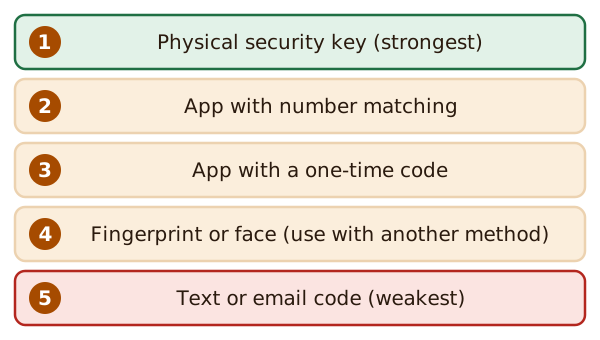
A physical security key gives the best protection against phishing, which is trickery that fools you into handing over a login.[3] An app can make a new code every 30 seconds.[3] A text or email code is the most familiar, but it gives the weakest protection.[3] Use it only if nothing stronger is on offer.
Turn it on for the admin login first. CISA says to start with admin accounts.[3] WordPress's own handbook also suggests two-step sign-in.[1] If your site doesn't offer it, WordPress's help page on hacked sites says plugins are available to add it.[4]
What's next
Logins are one door. Old software is another. Read keeping software updated.
Sources
- Hardening WordPress, Advanced Administration Handbook, WordPress Developer Resources (accessed 2026-11-12)
- Require Strong Passwords, CISA (US Cybersecurity and Infrastructure Security Agency) (accessed 2026-11-12)
- Require Multifactor Authentication, CISA (US Cybersecurity and Infrastructure Security Agency) (accessed 2026-11-12)
- FAQ My site was hacked, WordPress.org Documentation (accessed 2026-11-12)