 Patched and Backed Up
What a web application firewall does for a small site
Last reviewed
In short
- A web application firewall filters the traffic going to your website.
- It uses rules to stop common attacks.
- It's an extra layer. It doesn't replace updates, strong logins or backups.
What it is
A firewall is a filter for traffic. A web application firewall, or WAF, is a firewall made for websites.[1] It deals with web traffic, which is called HTTP traffic.[1]
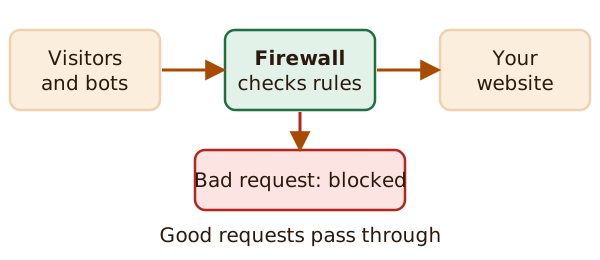
It sits in front of your site and looks at the traffic going in and out.[1]
How it decides
A WAF applies a set of rules to each web request.[2] Think of a bouncer with a checklist. If a request matches a rule for a known attack, it's stopped.
Those rules usually cover common attacks. OWASP names two: cross-site scripting (often shortened to XSS) and SQL injection.[2] Both try to sneak harmful code into a site through a form or a web address.
Where one can sit
WordPress's own hardening guide says many plugins and services can act as a firewall for your site.[3] They work in different places.
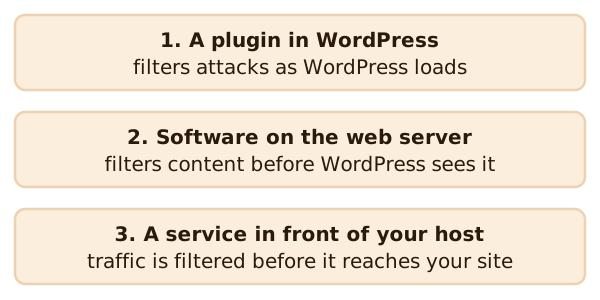
- In WordPress. Some plugins try to filter attacks while WordPress is loading, before it has fully processed them.[3]
- On the web server. You can install a WAF there to filter content before WordPress handles it.[3] This is usually something your host sets up, not you.
- In front of your host. A firewall service can sit between internet traffic and your hosting server.[3]
Your host may already offer one of these. Check your host's help pages or ask their support. This site doesn't rank or recommend products.
What it won't do
A firewall checks requests against rules. It isn't a cure-all. That's our reading, not a claim from the sources above. Some things it can't fix:
- A stolen password. A thief who logs in with the right details looks like you. See logins, passwords and two-factor.
- A site that's already been broken into. See recovering a hacked site.
- Lost files. Only a backup brings those back. See backups that work.
A firewall works best next to the basics, including keeping your software updated.
Questions to ask
If you're thinking about a firewall, ask your host:
- Is one already included?
- Where does it sit: in WordPress, on the server, or in front of the host?
- Who sets it up and keeps its rules current?
If you need to meet a legal or payment-card rule, ask a qualified professional.
What's next
A firewall is one layer. To spot trouble that gets past it, read signs your site was hacked.
Sources
- Web application firewall, Wikipedia (accessed 2026-11-17)
- Web Application Firewall, OWASP Foundation (accessed 2026-11-17)
- Hardening WordPress, Advanced Administration Handbook, WordPress Developer Resources (accessed 2026-11-17)